SHOP 59

SHOP 59

Tired of high game prices? 💸 Want to play new releases without breaking the bank? 🎯 We offer competitive account rentals for the most popular Xbox games! 🎮

XBOX ACCOUNT ACTIVATION

1. On your console, go to SETTINGS → SYSTEM → TIME;
2. Set the time zone so that the time under TIME is any time between 3:00 AM and 5:00 AM (e.g., 4:00 AM);
3. Create a new account. To do this, press the Xbox button → scroll to your avatar → select ADD OR CHANGE → ADD NEW;
4. Select USE ANOTHER DEVICE;

Send the code that appears in the chat on the purchase page and wait for login confirmation,
without closing the code window;

5. After logging in, select the desired options from the drop-down windows on your console (the order may vary):
5.1) We found your account settings - No thanks;
5.2) Use of your data - Next;
5.3) Improve game features - No, thanks;
5.4) Send data to publishers - Next;
5.5) Sign-in and security settings - Unrestricted;
5.6) Link a controller to you - Skip;
5.7) Make this console your home Xbox? - MAYBE LATER;
5.8) Offer to purchase Game Pass - NO, THANKS;

6. Start downloading the games you want via My games & apps > Full library > Owned games;

7) Once the game is downloaded, sign out of the purchased account and set the time on your console to between 5:00 AM and 2:00 AM (e.g., 10:00 AM). The download will continue.

‼️IMPORTANT: YOU MUST LAUNCH THE GAMES EVERY TIME FOLLOWING THE INSTRUCTIONS BELOW ↓ ‼️ IF YOU DO NOT LOG OUT OF THE ACCOUNT YOU PURCHASED, YOU AND OTHER PLAYERS WILL BE KICKED OUT OF THE GAMES. FOLLOW THE LAUNCH METHOD.‼️

METHOD OF LAUNCHING GAMES


HOW TO LAUNCH THE GAME:

1) Initially, the time on the console should be from 5:00 a.m. to 3:00 a.m. (for example, 6 a.m.)!

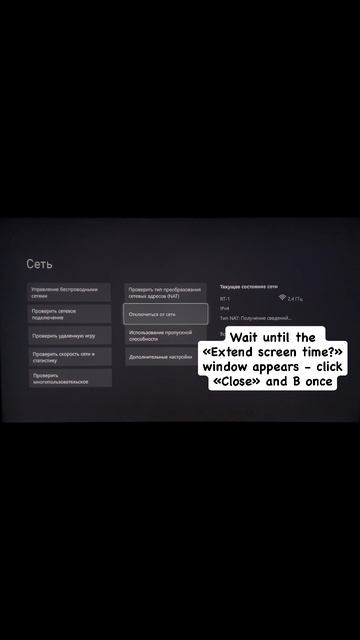
2) Log in to the purchased account, the "Extend screen time" window should appear - click "Next" (if the "Close" button appears, log in to the account again);

3) Go to Settings (settings) - "General" - "Network settings" – "Disconnect from the network" – click "In";

4) Go to the tab - "System" - "Time" – and by changing the time zone, set the time between 3:00 a.m. and 5:00 a.m. (for example, 4 a.m.) and press the "In" button once;

5) Log back into the purchased account;

6) Switch to a personal account;

7) Go to "General" - "Network settings" and click "Connect to network" (wait until fully connected);

8) Then change the time to any other time except 3-5 hours (for example, 6 a.m.);

9) Go to the home screen and start the game;

(If the error "The game is running in another location" appears, click "Play here");

10) Wait until the game is loaded to the main menu and log out of the shared account.

If it didn't work out the first time, try again! The main thing is not to play through a purchased account.
Изображение

Main questions

What to do if the game crashes?
1️⃣ If the game crashes and the message "Game launched in another location" appears:

☑️ This means you're not launching the game according to the instructions.
Review the launch instructions again❗️

2️⃣ If the game crashes to the main screen without errors, try the following:

☑️ Log in to the shared account (time between 5 AM and 3 AM), click NEXT again, and return to the game.

☑️ When launching the game, set a different daylight saving time within the desired range (from 5:00 AM to 3:00 AM).

☑️ Turn off the console, including unplugging it for a few minutes.

☑️ Clear the MAC address in Xbox Settings -> Network Settings -> Advanced Settings -> Secondary MAC Address -> Clear

☑️ (Offline Mode) Set DNS to 0.0.0.0 after launching the game in Xbox -> Network Settings -> Advanced Settings

☑️ Launch the game using this method:
Set the console's time to nighttime from 3:00 AM to 8:00 AM
- Disconnect from the network and log in to the purchased account, then immediately reconnect to the network
- Log out of the purchased account and change the time to daytime from 8:00 AM to 3:00 AM
- Log in to the purchased account, count to 2-3, and log out of your personal account.
- A sign should appear that says "Log out of your personal account" (then "Log out of the purchased account")
- Click Close
- Log in to the purchased account (a sign with a Next button will appear)
- Log in to your personal account
- Launch the game! This may fail several times in a row. If it continues to fail, try clearing the MAC address.

It asks for a password, where can I get it?
If your account rental period has not expired, contact the seller on the purchase page and ask for a new password!
How do I log in to my account to download a new game?
Disable the internet on your console, change the time from 3:00 AM to 5:00 AM, log in to the purchased account, and connect to the internet. After downloading the game, close the purchased account, and change the time back to 5:00 AM to 3:00 AM.